
Overview
Canceling or Postponing Events
How to communicate with guests when plans change. Archiving an event tells nobody, and it does not stop a campaign you already scheduled. Here is how to handle guest communication yourself.
What Archiving Actually Does in Gatsby
Section titled “What Archiving Actually Does in Gatsby”Gatsby has no separate cancel. The control is Archive Event, and it is a filing action: it takes the event off your dashboard. It tells nobody. Guests who already RSVP’d will show up unless you tell them otherwise.
When you archive an event:
- The event moves to Archived Events, at the bottom of Events and Lists
- Its parent and child links are removed, and restoring it later won’t bring them back
- No new emails go out on their own
- No calendar invites are removed or updated
- Your guests see no change at all
Archiving does not stop a campaign you already scheduled. A send that is queued for tomorrow morning still lands tomorrow morning, for an event you archived tonight. Open Campaigns and cancel the send yourself, before you archive.
If invitations never went out, archive and move on. If guests are expecting to attend, the archive is the last step, not the first.
Canceling an Event
Section titled “Canceling an Event”Four things to do, in this order: stop new registrations, stop any scheduled sends, notify your guests, archive the event.
Step 1: Close Registration
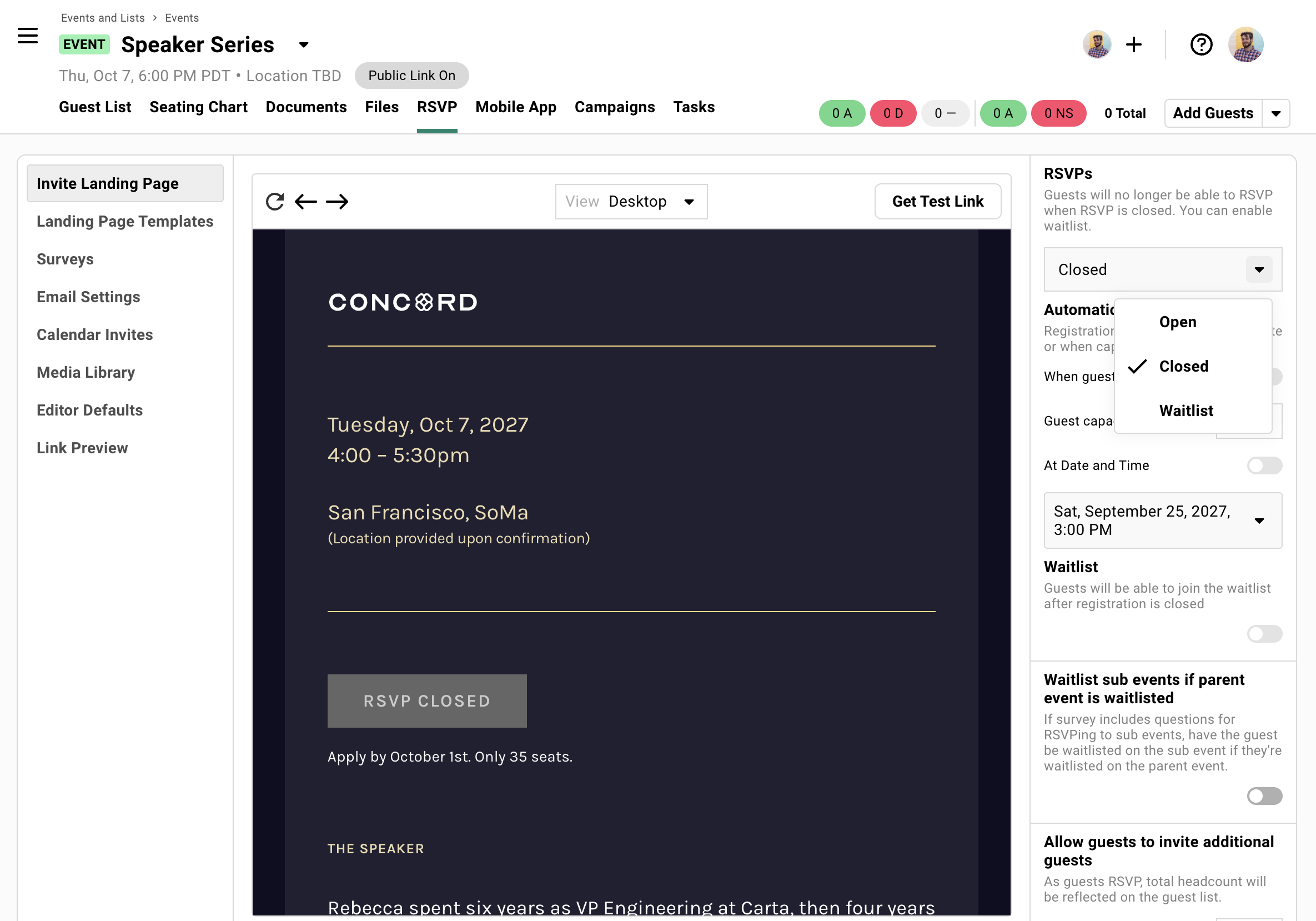
In the Registration tab, select Invite Landing Page on the left, then set the RSVPs dropdown on the right from Open to Closed. This prevents new RSVPs from any outstanding invitation links.
Do this first.
Step 2: Cancel anything already scheduled
Open Campaigns and look for sends that haven’t gone out yet. Cancel them.
Nothing else in this process does it for you. Archiving the event at the end won’t, and a scheduled send stays live right up to the moment it fires, so an invitation can land in your guests’ inboxes hours after you’ve called the event off.
Step 3: Send a cancellation campaign
Use Campaigns to email guests who accepted. Filter by RSVP status to reach everyone who committed.
Include why you’re canceling (if appropriate) and any next steps.
Step 4 (optional): Rename the event and send an update
If you edit event details and rename the event like, “[CANCELED] Event Name”, we’ll give you the option to send a calendar invite notice to your guests who have been sent a calendar invite before.
This renames the event in their calendar for extra clarity.
Step 5: Archive the event
Do this last, once the emails have gone out.
-
Click the dropdown next to the event name.
-
Select Edit Event Details.
-
Click Archive Event, bottom left of the dialog.
-
Tick I understand, then confirm.
The event moves to Archived Events, at the bottom of Events and Lists.
Postponing an Event
Section titled “Postponing an Event”Same flow, one key difference: preserve the event. When you set the new date, you can re-engage the same guests without starting over.
What to Do Now
-
Close registration.
-
Send a campaign explaining the postponement and when you’ll share the new date.
-
Edit event details and rename the event with something like “[Postponed] Event Name”
-
Do NOT archive the event. Keep it active so you can update it later.
When You Have a New Date
-
Edit event details, set the new date and time, and rename the event.
-
Send the calendar invite update now (or share later)
-
Send a follow-up campaign.
Include guests’ personal RSVP links so they can confirm or change their response.
What About Calendar Invites?
Section titled “What About Calendar Invites?”Guests have the event on their calendar. Should you remove it for them?
You can send calendar updates or deletions through Gatsby. But we recommend a simpler approach: tell guests the event is canceled and let them remove it from their own calendar.
Why? A calendar invite disappearing without explanation feels abrupt. Guests wonder if something went wrong. A clear email followed by them managing their own calendar is cleaner.
If You Still Want to Send a Calendar Update
Rename the event to include “[CANCELED]” in the title. When you save, Gatsby offers to send a calendar update to guests who already have the invite.
This updates the title on their calendar without removing the event.
Why We Don't Recommend Calendar Deletions
Gatsby can remove calendar invites by changing guest RSVP status to “Declined.” But this deletes RSVP tracking data and sends a system notification that can feel impersonal.
Better to communicate clearly and let guests handle their calendars.
Common Questions
Section titled “Common Questions” What about guests who never RSVP'd?
Pending guests never received calendar invites. They only know about the cancellation if you email them.
Consider whether you want to send a campaign to invited-but-not-responded guests, or just those who accepted.
Can I restore an archived event?
Yes. Archiving deletes nothing.
Find the event under Archived Events, at the bottom of Events and Lists. Open the three-dots menu on its card and choose Restore Event, the only item there.
One thing doesn’t come back. If the event had parent or child links, the archive removed them, and restoring won’t rebuild them. Undo on the toast that appears right after archiving is the only path that does.
What do guests see after I archive the event?
Nothing changes for them. Archiving is invisible to guests. Their invitation still sits in their inbox, their personal RSVP link still works, and any calendar invite they accepted is still on their calendar.
The one thing that does change what they see is closing registration, which is Step 1. Gatsby leaves your landing page content alone and swaps the button for its closed state, typically RSVP Closed.
That is the whole reason this page exists: if you want guests to know, you have to tell them.